MS2 Spectrum Processor
Downloads for 9 PD versions
PD3.3.zip
SHA-256 4ef2bc0f05aa379f04746277e364e94ff70243c52057f97aa031133f7600be0e
| SHA-256 | 4ef2bc0f05aa379f04746277e364e94ff70243c52057f97aa031133f7600be0e |
|---|---|
| MD5 | c883db2b2ea988efe2620f7957cdef89 |
Downloads the file and checks its SHA-256; a click selects a whole checksum or command.
$ProgressPreference = 'SilentlyContinue'; $f = 'PD3.3.zip'; Invoke-WebRequest -Uri 'https://ms.imp.ac.at/data/software_new/IMP.SpectrumProcessorNode/v1.0.3/PD3.3/PD3.3.zip' -OutFile $f; if ((Get-FileHash $f -Algorithm SHA256).Hash -eq '4ef2bc0f05aa379f04746277e364e94ff70243c52057f97aa031133f7600be0e') { "OK: $f" } else { Remove-Item $f; Write-Error 'Checksum mismatch, file deleted' }curl -fL -o 'PD3.3.zip' 'https://ms.imp.ac.at/data/software_new/IMP.SpectrumProcessorNode/v1.0.3/PD3.3/PD3.3.zip' && echo '4ef2bc0f05aa379f04746277e364e94ff70243c52057f97aa031133f7600be0e PD3.3.zip' | sha256sum -c -curl -fL -o 'PD3.3.zip' 'https://ms.imp.ac.at/data/software_new/IMP.SpectrumProcessorNode/v1.0.3/PD3.3/PD3.3.zip' && echo '4ef2bc0f05aa379f04746277e364e94ff70243c52057f97aa031133f7600be0e PD3.3.zip' | shasum -a 256 -c -PD3.1.zip
SHA-256 2873840c418da8a7948f6128f4541a83e3307645785f07ad65dfb369a1949f66
| SHA-256 | 2873840c418da8a7948f6128f4541a83e3307645785f07ad65dfb369a1949f66 |
|---|---|
| MD5 | 35a676c267d1c56b1771763c56a79417 |
Downloads the file and checks its SHA-256; a click selects a whole checksum or command.
$ProgressPreference = 'SilentlyContinue'; $f = 'PD3.1.zip'; Invoke-WebRequest -Uri 'https://ms.imp.ac.at/data/software_new/IMP.SpectrumProcessorNode/v1.1.0/PD3.1/PD3.1.zip' -OutFile $f; if ((Get-FileHash $f -Algorithm SHA256).Hash -eq '2873840c418da8a7948f6128f4541a83e3307645785f07ad65dfb369a1949f66') { "OK: $f" } else { Remove-Item $f; Write-Error 'Checksum mismatch, file deleted' }curl -fL -o 'PD3.1.zip' 'https://ms.imp.ac.at/data/software_new/IMP.SpectrumProcessorNode/v1.1.0/PD3.1/PD3.1.zip' && echo '2873840c418da8a7948f6128f4541a83e3307645785f07ad65dfb369a1949f66 PD3.1.zip' | sha256sum -c -curl -fL -o 'PD3.1.zip' 'https://ms.imp.ac.at/data/software_new/IMP.SpectrumProcessorNode/v1.1.0/PD3.1/PD3.1.zip' && echo '2873840c418da8a7948f6128f4541a83e3307645785f07ad65dfb369a1949f66 PD3.1.zip' | shasum -a 256 -c -ms2spectrumprocessor_3.0.zip
SHA-256 06f32291f04b1232c62e62c7635a4a6e0b68bb5cbe6d29cf700f9582ca8e2841
| SHA-256 | 06f32291f04b1232c62e62c7635a4a6e0b68bb5cbe6d29cf700f9582ca8e2841 |
|---|---|
| MD5 | d7902e8d46921c6c58975cd5e52ac533 |
Downloads the file and checks its SHA-256; a click selects a whole checksum or command.
$ProgressPreference = 'SilentlyContinue'; $f = 'ms2spectrumprocessor_3.0.zip'; Invoke-WebRequest -Uri 'https://ms.imp.ac.at/data/spectrum-processor/ms2spectrumprocessor_3.0.zip' -OutFile $f; if ((Get-FileHash $f -Algorithm SHA256).Hash -eq '06f32291f04b1232c62e62c7635a4a6e0b68bb5cbe6d29cf700f9582ca8e2841') { "OK: $f" } else { Remove-Item $f; Write-Error 'Checksum mismatch, file deleted' }curl -fL -o 'ms2spectrumprocessor_3.0.zip' 'https://ms.imp.ac.at/data/spectrum-processor/ms2spectrumprocessor_3.0.zip' && echo '06f32291f04b1232c62e62c7635a4a6e0b68bb5cbe6d29cf700f9582ca8e2841 ms2spectrumprocessor_3.0.zip' | sha256sum -c -curl -fL -o 'ms2spectrumprocessor_3.0.zip' 'https://ms.imp.ac.at/data/spectrum-processor/ms2spectrumprocessor_3.0.zip' && echo '06f32291f04b1232c62e62c7635a4a6e0b68bb5cbe6d29cf700f9582ca8e2841 ms2spectrumprocessor_3.0.zip' | shasum -a 256 -c -ms2spectrumprocessor_2.5.zip
SHA-256 5a7629ac847b3e2e11c7d0fe4304842cebeac88a3a33fe69f9ab40bd4b20ad1d
| SHA-256 | 5a7629ac847b3e2e11c7d0fe4304842cebeac88a3a33fe69f9ab40bd4b20ad1d |
|---|---|
| MD5 | 19dbbfebcfef42be7000ad76d74fa54e |
Downloads the file and checks its SHA-256; a click selects a whole checksum or command.
$ProgressPreference = 'SilentlyContinue'; $f = 'ms2spectrumprocessor_2.5.zip'; Invoke-WebRequest -Uri 'https://ms.imp.ac.at/data/spectrum-processor/ms2spectrumprocessor_2.5.zip' -OutFile $f; if ((Get-FileHash $f -Algorithm SHA256).Hash -eq '5a7629ac847b3e2e11c7d0fe4304842cebeac88a3a33fe69f9ab40bd4b20ad1d') { "OK: $f" } else { Remove-Item $f; Write-Error 'Checksum mismatch, file deleted' }curl -fL -o 'ms2spectrumprocessor_2.5.zip' 'https://ms.imp.ac.at/data/spectrum-processor/ms2spectrumprocessor_2.5.zip' && echo '5a7629ac847b3e2e11c7d0fe4304842cebeac88a3a33fe69f9ab40bd4b20ad1d ms2spectrumprocessor_2.5.zip' | sha256sum -c -curl -fL -o 'ms2spectrumprocessor_2.5.zip' 'https://ms.imp.ac.at/data/spectrum-processor/ms2spectrumprocessor_2.5.zip' && echo '5a7629ac847b3e2e11c7d0fe4304842cebeac88a3a33fe69f9ab40bd4b20ad1d ms2spectrumprocessor_2.5.zip' | shasum -a 256 -c -ms2spectrumprocessor_2.4.zip
SHA-256 a101da56eef08708b16ad35eaa095f82753453115c175d79c30bd79d1f7ab357
| SHA-256 | a101da56eef08708b16ad35eaa095f82753453115c175d79c30bd79d1f7ab357 |
|---|---|
| MD5 | 78a90515b6e8ba63c49f7e7082e008f6 |
Downloads the file and checks its SHA-256; a click selects a whole checksum or command.
$ProgressPreference = 'SilentlyContinue'; $f = 'ms2spectrumprocessor_2.4.zip'; Invoke-WebRequest -Uri 'https://ms.imp.ac.at/data/spectrum-processor/ms2spectrumprocessor_2.4.zip' -OutFile $f; if ((Get-FileHash $f -Algorithm SHA256).Hash -eq 'a101da56eef08708b16ad35eaa095f82753453115c175d79c30bd79d1f7ab357') { "OK: $f" } else { Remove-Item $f; Write-Error 'Checksum mismatch, file deleted' }curl -fL -o 'ms2spectrumprocessor_2.4.zip' 'https://ms.imp.ac.at/data/spectrum-processor/ms2spectrumprocessor_2.4.zip' && echo 'a101da56eef08708b16ad35eaa095f82753453115c175d79c30bd79d1f7ab357 ms2spectrumprocessor_2.4.zip' | sha256sum -c -curl -fL -o 'ms2spectrumprocessor_2.4.zip' 'https://ms.imp.ac.at/data/spectrum-processor/ms2spectrumprocessor_2.4.zip' && echo 'a101da56eef08708b16ad35eaa095f82753453115c175d79c30bd79d1f7ab357 ms2spectrumprocessor_2.4.zip' | shasum -a 256 -c -ms2spectrumprocessor_2.3.zip
SHA-256 67314a9bc97e1e58ff7988db953b4ada5427ddd8be288328728ae1a8d711520f
| SHA-256 | 67314a9bc97e1e58ff7988db953b4ada5427ddd8be288328728ae1a8d711520f |
|---|---|
| MD5 | 3f2c20c987e6605557af9f1ed59ebc80 |
Downloads the file and checks its SHA-256; a click selects a whole checksum or command.
$ProgressPreference = 'SilentlyContinue'; $f = 'ms2spectrumprocessor_2.3.zip'; Invoke-WebRequest -Uri 'https://ms.imp.ac.at/data/spectrum-processor/ms2spectrumprocessor_2.3.zip' -OutFile $f; if ((Get-FileHash $f -Algorithm SHA256).Hash -eq '67314a9bc97e1e58ff7988db953b4ada5427ddd8be288328728ae1a8d711520f') { "OK: $f" } else { Remove-Item $f; Write-Error 'Checksum mismatch, file deleted' }curl -fL -o 'ms2spectrumprocessor_2.3.zip' 'https://ms.imp.ac.at/data/spectrum-processor/ms2spectrumprocessor_2.3.zip' && echo '67314a9bc97e1e58ff7988db953b4ada5427ddd8be288328728ae1a8d711520f ms2spectrumprocessor_2.3.zip' | sha256sum -c -curl -fL -o 'ms2spectrumprocessor_2.3.zip' 'https://ms.imp.ac.at/data/spectrum-processor/ms2spectrumprocessor_2.3.zip' && echo '67314a9bc97e1e58ff7988db953b4ada5427ddd8be288328728ae1a8d711520f ms2spectrumprocessor_2.3.zip' | shasum -a 256 -c -ms2spectrumprocessor_2.1.zip
SHA-256 fbfe2922f1ac0111f4fb93c19d7947065ec18e8218004bb5c2967fecf1e632b8
| SHA-256 | fbfe2922f1ac0111f4fb93c19d7947065ec18e8218004bb5c2967fecf1e632b8 |
|---|---|
| MD5 | 9f4bff8f747608c9ebbba36d4c847d88 |
Downloads the file and checks its SHA-256; a click selects a whole checksum or command.
$ProgressPreference = 'SilentlyContinue'; $f = 'ms2spectrumprocessor_2.1.zip'; Invoke-WebRequest -Uri 'https://ms.imp.ac.at/data/spectrum-processor/ms2spectrumprocessor_2.1.zip' -OutFile $f; if ((Get-FileHash $f -Algorithm SHA256).Hash -eq 'fbfe2922f1ac0111f4fb93c19d7947065ec18e8218004bb5c2967fecf1e632b8') { "OK: $f" } else { Remove-Item $f; Write-Error 'Checksum mismatch, file deleted' }curl -fL -o 'ms2spectrumprocessor_2.1.zip' 'https://ms.imp.ac.at/data/spectrum-processor/ms2spectrumprocessor_2.1.zip' && echo 'fbfe2922f1ac0111f4fb93c19d7947065ec18e8218004bb5c2967fecf1e632b8 ms2spectrumprocessor_2.1.zip' | sha256sum -c -curl -fL -o 'ms2spectrumprocessor_2.1.zip' 'https://ms.imp.ac.at/data/spectrum-processor/ms2spectrumprocessor_2.1.zip' && echo 'fbfe2922f1ac0111f4fb93c19d7947065ec18e8218004bb5c2967fecf1e632b8 ms2spectrumprocessor_2.1.zip' | shasum -a 256 -c -ms2spectrumprocessor_1.4.zip
SHA-256 ac18ec607c0bfb14e95b8e953f07ff6a3014faee71919cbe80468f6c375b22df
| SHA-256 | ac18ec607c0bfb14e95b8e953f07ff6a3014faee71919cbe80468f6c375b22df |
|---|---|
| MD5 | 3045594c69553a7d3d3e70ebfc10135b |
Downloads the file and checks its SHA-256; a click selects a whole checksum or command.
$ProgressPreference = 'SilentlyContinue'; $f = 'ms2spectrumprocessor_1.4.zip'; Invoke-WebRequest -Uri 'https://ms.imp.ac.at/data/spectrum-processor/ms2spectrumprocessor_1.4.zip' -OutFile $f; if ((Get-FileHash $f -Algorithm SHA256).Hash -eq 'ac18ec607c0bfb14e95b8e953f07ff6a3014faee71919cbe80468f6c375b22df') { "OK: $f" } else { Remove-Item $f; Write-Error 'Checksum mismatch, file deleted' }curl -fL -o 'ms2spectrumprocessor_1.4.zip' 'https://ms.imp.ac.at/data/spectrum-processor/ms2spectrumprocessor_1.4.zip' && echo 'ac18ec607c0bfb14e95b8e953f07ff6a3014faee71919cbe80468f6c375b22df ms2spectrumprocessor_1.4.zip' | sha256sum -c -curl -fL -o 'ms2spectrumprocessor_1.4.zip' 'https://ms.imp.ac.at/data/spectrum-processor/ms2spectrumprocessor_1.4.zip' && echo 'ac18ec607c0bfb14e95b8e953f07ff6a3014faee71919cbe80468f6c375b22df ms2spectrumprocessor_1.4.zip' | shasum -a 256 -c -ms2spectrumprocessor_1.3.zip
SHA-256 43297bb1b138e12d359d2fb4095feceb2bd5ac6b7fb45c466dc151bfa4ac7ad8
| SHA-256 | 43297bb1b138e12d359d2fb4095feceb2bd5ac6b7fb45c466dc151bfa4ac7ad8 |
|---|---|
| MD5 | 314b65e50fa0e0e2baecc455aa6d1bd0 |
Downloads the file and checks its SHA-256; a click selects a whole checksum or command.
$ProgressPreference = 'SilentlyContinue'; $f = 'ms2spectrumprocessor_1.3.zip'; Invoke-WebRequest -Uri 'https://ms.imp.ac.at/data/spectrum-processor/ms2spectrumprocessor_1.3.zip' -OutFile $f; if ((Get-FileHash $f -Algorithm SHA256).Hash -eq '43297bb1b138e12d359d2fb4095feceb2bd5ac6b7fb45c466dc151bfa4ac7ad8') { "OK: $f" } else { Remove-Item $f; Write-Error 'Checksum mismatch, file deleted' }curl -fL -o 'ms2spectrumprocessor_1.3.zip' 'https://ms.imp.ac.at/data/spectrum-processor/ms2spectrumprocessor_1.3.zip' && echo '43297bb1b138e12d359d2fb4095feceb2bd5ac6b7fb45c466dc151bfa4ac7ad8 ms2spectrumprocessor_1.3.zip' | sha256sum -c -curl -fL -o 'ms2spectrumprocessor_1.3.zip' 'https://ms.imp.ac.at/data/spectrum-processor/ms2spectrumprocessor_1.3.zip' && echo '43297bb1b138e12d359d2fb4095feceb2bd5ac6b7fb45c466dc151bfa4ac7ad8 ms2spectrumprocessor_1.3.zip' | shasum -a 256 -c -Not supported: PD2.0, PD2.2, PD3.2.
This software has been developed to be used with the Thermo Scientific Proteome Discoverer software, versions 1.3 to 3.3 (see Downloads above). It adds a new node that can be incorporated into the workflow allowing the execution of the following two MS2-spectrum preprocessing steps:
- Deisotoping of isotopic clusters
- The spectra are searched for isotopic clusters by determining the distances in m/z values between pairs of peaks. For every cluster that is detected, only the monoisotopic peaks remains in the spectrum, the others peaks are removed from it. If deisotoping should be applied to the reporter ion region (ions below 132 Da), as well, this can be set by toggling the parameter deisotope reporter region to true. It is possible to set a tolerance value (in Da or mmu), controlling how strict the algorithm will behave when comparing a calculated distance to the expected distance of an isotope peak. Furthermore, the deisotoping can be done by using averagine modeling. I.e. the peaks of the detected isotopic clusters are compared against the isotopic distribution of a poly-averagine of the same mass as the peptide to which the isotopic cluster belongs. A more detailed description of the parameters that can be set there will follow soon...
- Charge-Deconvolution
- In order to facilitate the protein identification process, the spectra can be deconvolved to charge state 1.
Every peak that has a charge state greater than 1 will be removed from the spectrum and replaced by a peak at the corresponding singly-charged m/z-position with the same intensity.
Note that the algorithm only works on peaks having charge state information available.
The Deisotoping algorithm adds charge state information to the remaining monoisotopic peaks. Thus, unless you are sure that the peaks in the MS2-spectra are annotated with their charge states, we recommend using Charge Deconvolution in combination with Deisotoping. - MS1-Precursor Recalculation
- The algorithm reconstructs the elution profile of the peptide and uses the gathered data to calculate a more precise value of the mass. The default settings are the recommended settings that were evaluated experimentally, however a more detailed description will follow soon...
Usage
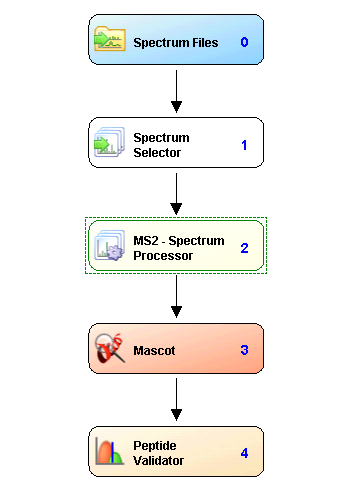
Simply include the MS2 – Sepctrum Processor node into a workflow, preceded by a Spectrum Source (e.g. Spectrum Selector or another spectrum manipulation node) and followed by the search node, or another spectrum manipulation node.
Workflow example
Performance
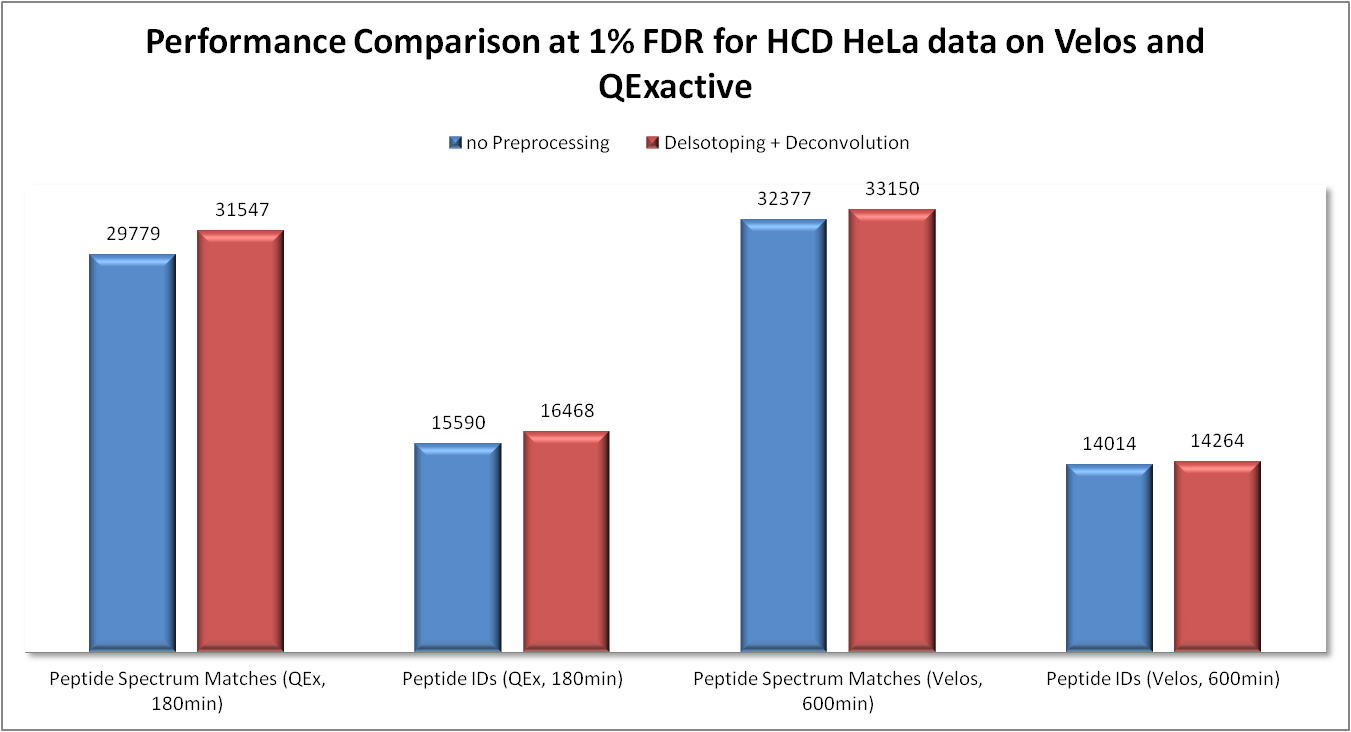
We analysed the performance of the MS2-Spectrum Processor node for two HCD HeLa samples (both 1 μg) which were run on a QExactive and a Velos Orbitrap.
The following chart shows a comparison in the obtained results regarding the Peptide Spectrum Matches (PSMs) and the Peptide Identifications at 1% FDR.
The resulting .msf-files generated by Thermo Scientific Proteome Discoverer can be downloaded here:
- QEx, no Preprocessing
- QEx, with Deisotoping and Deconvolution
- Velos, no Preprocessing
- Velos, with Deisotoping and Deconvolution
In the following table the corresponding filter settings that were used in Proteome Discoverer to achieve the 1% FDR for PSMs, as well as Peptide Identifications are listed:
| QEx | Velos | |||||||
|---|---|---|---|---|---|---|---|---|
| No preprocessing | Deisotoping & deconvolution | No preprocessing | Deisotoping & deconvolution | |||||
| PSMs | Peptides | PSMs | Peptides | PSMs | Peptides | PSMs | Peptides | |
| Lowest Peptide Length | 8 | 8 | 8 | 8 | 8 | 8 | 8 | 8 |
| Search Engine Rank | 1 | 1 | 1 | 1 | 1 | 1 | 1 | 1 |
| Peptide Score (Mascot) | 5.83 | 8 | 5.44 | 7.67 | 3.95 | 7.5 | 4.09 | 7.3 |
Download and installation
For Proteome Discoverer 2.1 use the installer.
- Download the node’s DLLs (for PD 1.3, PD 1.4, PD 2.1, PD 2.3, PD 2.4 or PD 2.5) and read carefully the attached license agreement. Proceed only if you agree to the terms and conditions of the license.
- Save all your files and shutdown Thermo Scientific Proteome Discoverer.
- Copy the downloaded DLLs to the Proteome Discoverer Release folder,
e.g. "C:\Program Files\Thermo\Discoverer Demo 1.3\System\Release" - Right-click all DLLs, open its properties window and click the Unblock botton if available.
- Unblocking the dll file
- Open a command prompt and navigate to the Proteome Discoverer Release folder.
- Enter "Thermo.Magellan.Server –install" (without the quotes).
- You should see the message, indicating that the installation worked sucessfully:
"INFO - ProcessingNodeManager: Node: MS2 - Spectrum Processor registered"